Working Remotely and Virtually
A Blog from Mike Irving, Software Developer
By Mike Irving - Published: 8/6/2008
In today's increasingly networked world, the internet provides many ways of working both remotely and virtually.
When at a remote location, we can take advantage of VPN technologies, Remote Desktop connections and check our email using Outlook Web Access. We can also use programs like Microsoft Virtual PC to work Virtually on other Platforms or Environments.
VPN - Virtual Private Network
Using a VPN, you can connect to a remote network, such as the one at your workplace, and connect network drives on your PC, so as you can work "virtually" as if you were connected locally on the network.
Remote Desktop
With Remote Desktop, we can actually connect to a Remote PC, such as one at your workplace, and control it completely remotely. You can connect to any PC that will allow Remote Connections over the internet, or connect "virtually" once logged into a VPN. The advantage of Remote Desktop is that you can run software installed on your remote machine, that may not be installed on your local machine.
Microsoft Virtual PC
Microsoft Virtual PC lets us run virtual images of machines, for test purposes. In my work of web design and development, I often run a Virtual PC of a machine running Windows XP Service Pack 2 with Internet Explorer 6, so as I can check my websites for backwards compatability with IE6.
Outlook Web Access
Outlook / Exchange Web Access is a web application that can be set up to allow remote access to your Exchange Email. The application runs via your web browser, and recreates most of the main functionality of Microsoft Outlook over the web.
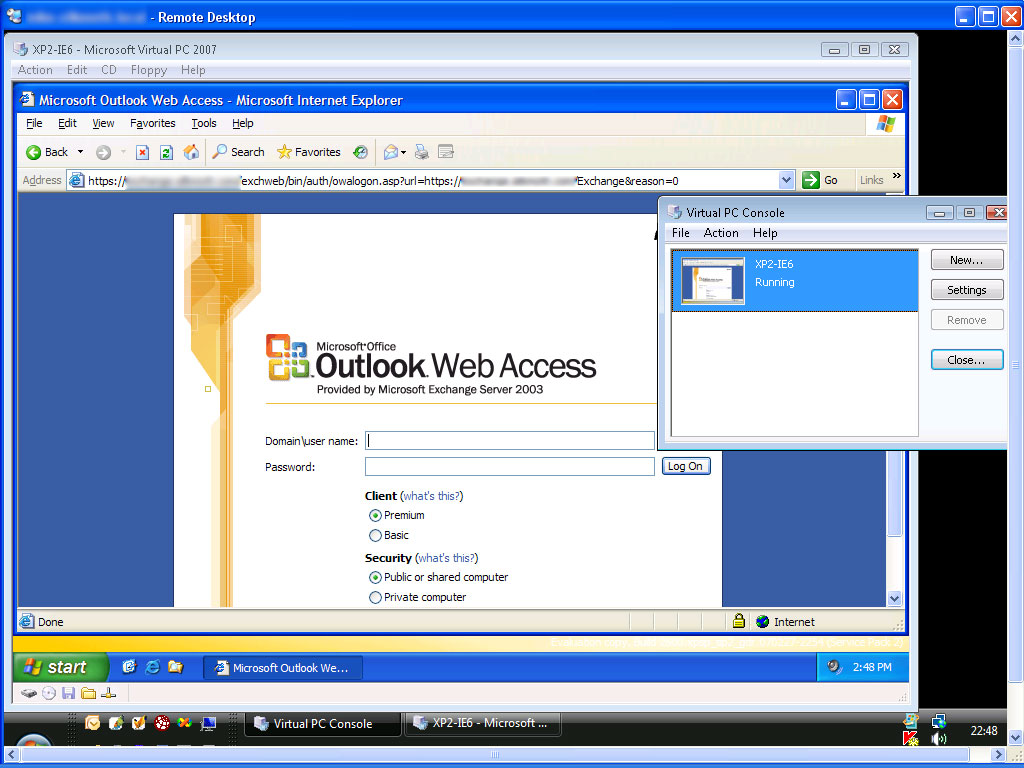
Have a look at my screenshot of my Windows XP PC connected to a VPN, running a Remote Desktop connection to a Windows Vista PC, running a Virtual PC image of XP SP2, running IE6, running Outlook Web Access!
Please Contact Me if you'd like to ask a question about working Remotely or Virtually.
View Blog Entries...
Page: 1, 2, 3, 4, 5, 6, 7, 8, 9, 10, 11